Web Development Guides
ChatGPT Recommends Your Competitor, Not You? What to Change on Your Website So AI Search Can Find You
ChatGPT names your competitor, not you? Check crawler access, fix service pages and business data, and skip AI-visibility myths Google and OpenAI reject.
Dev Artistry Hub9 min read
In this article — 7 sections
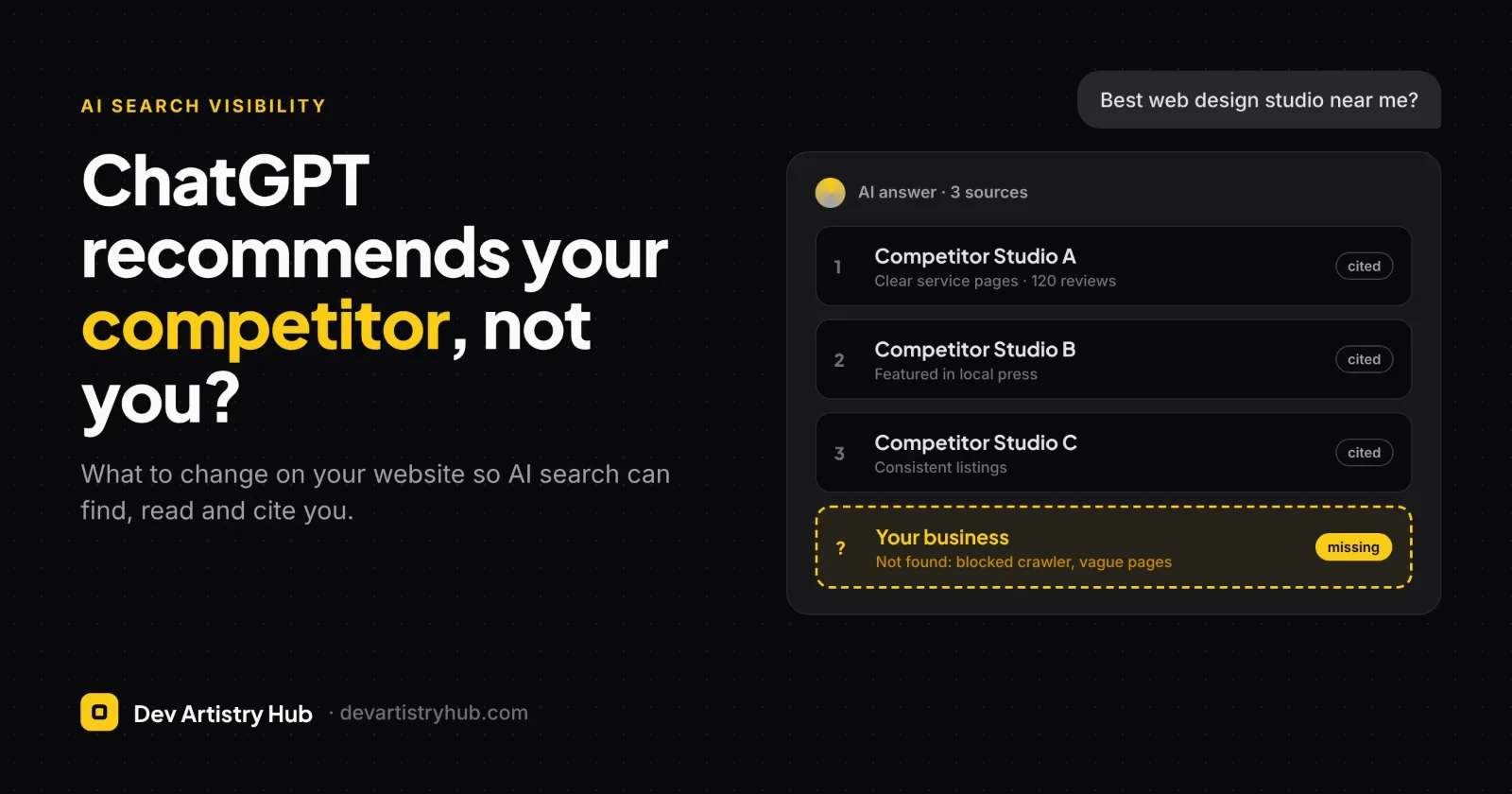
If ChatGPT names your competitor and not you, the usual reason is that AI search can find, read and trust more about them than about you. That comes down to three things: whether AI crawlers can reach your site, whether your pages say clearly what you do and where, and how often other sites mention you. You can't pay to be recommended, but most of the fixes are on your own website and are quicker than people expect.
Short answer: Make sure OAI-SearchBot and Googlebot aren't blocked, put your services and locations in plain text on dedicated pages, keep your business details identical everywhere, and earn mentions on sites AI tools already read. Skip special "AI files" and "AI schema"; Google says you don't need them.
If you're still deciding how the site itself should be built, start with whether an AI website builder can replace a web developer.
How AI assistants decide which businesses to mention
When someone asks ChatGPT "who's the best Shopify developer for a small fashion brand?" or "good dentist near Leeds city centre", ChatGPT often runs a live web search before answering. It reads a handful of pages, then writes a summary with links. Google's AI Overviews and AI Mode work in a similar way, drawing on pages already in Google's index.
Neither OpenAI nor Google publishes a ranking formula for this. What they do confirm is the entry ticket:
- OpenAI: "Any public website can appear in ChatGPT search," but sites that block its search crawler, OAI-SearchBot, "will not be shown in ChatGPT search answers" beyond a bare link.
- Google: to be a supporting link in AI Overviews or AI Mode, a page must be "indexed and eligible to be shown in Google Search with a snippet". Google adds there are "no additional technical requirements."
Beyond that, the pattern is familiar from SEO. The AI favours pages that answer the question directly, and businesses that several independent sources describe consistently. An early BrightLocal study of 800 local searches in ChatGPT (November 2024) found that business websites made up 58% of the sources cited, followed by mentions on other sites (27%) and directories (15%). That study is from ChatGPT search's first months, so treat the numbers as directional. The takeaway still holds: your own website is the largest single source, so it's the first place to work on.
Check where you stand: a 15-minute test
Before changing anything, find out what AI tools currently "know" about you.
- Ask the questions your customers ask. In ChatGPT (with search on), Google AI Mode and Perplexity, try three or four real queries: "best [service] in [city]", "[service] for [type of customer]", and your business name plus "reviews". Note who gets named and which pages are cited.
- Ask about yourself directly. "What does [your business] do and where is it based?" Wrong or vague answers tell you which facts are missing or inconsistent online.
- Open the cited pages. Look at what the recommended competitors have that you don't: a dedicated page for that service, a clear location, reviews on third-party sites, a mention in a local or industry article.
- Check your crawler access. Open
yourdomain.com/robots.txtand look for lines that blockOAI-SearchBot,Googlebotor all bots. Then check Google Search Console's Page indexing report for your key pages.
Write down the gaps. They become your to-do list for the next two sections.
Fix the blockers first
These are the problems that stop AI search from using your site at all. They're also the cheapest to fix.
1. robots.txt blocking the wrong bot. OpenAI runs separate crawlers. OAI-SearchBot decides whether your pages can appear in ChatGPT search. GPTBot collects content that may be used for training. Sites that block "all AI bots" can end up blocking search too, without realising it. If you don't want your content used for training but do want to be recommended, the rule looks like this:
User-agent: OAI-SearchBot
Allow: /

User-agent: GPTBot
Disallow: /
OpenAI notes that robots.txt changes can take about 24 hours to affect search. Also note that ChatGPT-User, the agent that fetches a page when someone pastes your link into a chat, "is not used to determine whether content may appear in Search."
2. Your host, CDN or firewall blocking bots. Google's guidance asks that crawling is allowed "in robots.txt, and by any CDN or hosting infrastructure." Security plugins, Cloudflare bot rules and some managed hosts can challenge or block crawlers even when robots.txt allows them. Check your firewall logs or bot settings for blocks on OAI-SearchBot and Googlebot.
3. Key pages not indexed. If a service page isn't in Google's index, it can't appear in AI Overviews. Use Search Console's URL Inspection on your top five pages. Common causes on WordPress sites are a leftover noindex from staging, a "Discourage search engines" box still ticked, or a canonical tag pointing to the wrong URL.
4. Content hidden from text readers. Services listed only inside images, sliders, tabs that load by script, or PDFs are harder for any crawler to read. Google recommends making sure important content is "available in textual form". Your services, locations, prices if you publish them, and contact details should be visible HTML text on the page.
Website changes that make you easy to cite
Once crawlers can reach you, the job is to make your pages the easiest source to quote. AI answers are built from clear, specific sentences, so write some.
One page per service, and one per location if you serve several. "Web design, SEO, branding and more" on a single page gives an AI nothing specific to cite for "Shopify developer for fashion brands". A dedicated page with a clear heading, who it's for, what's included, the process and typical timelines does.
Answer the question in the first lines. Start key pages with a plain sentence that could be quoted on its own: "Northside Dental is a family dental practice in Leeds city centre offering check-ups, implants and emergency appointments six days a week." Put the detail after it.
Make your business details identical everywhere. Name, address, phone, opening hours and service area should match exactly across your website, Google Business Profile, Bing Places, social profiles and directories. Google lists keeping your Business Profile information up to date as a best practice for its AI features. Conflicting details give AI tools a reason to hedge or pick someone else.
Add an About page that proves you're real. Who runs the business, how long you've traded, where you're based, any certifications or memberships, and links to your profiles elsewhere. These are the facts an AI uses to describe you, and they should come from you.
Show proof on your own site. Case studies with the client's permission, project photos, named reviews and specific results give AI tools quotable evidence. Be accurate; AI answers repeat claims, so a vague or inflated one will be repeated too.
Use structured data, but only to match what's on the page. LocalBusiness or Organization markup, Product markup for stores, and Article markup for posts help search engines read the basics. Google says there is "no special schema.org structured data that you need to add" for AI features, and that markup should match the visible text. Treat schema as tidy labelling, not a ranking trick.
Build pages around real questions. If customers keep asking "how long does a Shopify migration take?" or "do you work with clients abroad?", answer them on the relevant service page or in a short FAQ. The same questions get typed into AI tools.
Off-site signals your website can't fake
Your website explains what you do. Other sites are how AI tools check that it's true. In the BrightLocal study, mentions on other sites and directories made up the remaining 42% of sources, so they're not optional.
- Reviews on platforms people trust. Google reviews, plus whichever platforms matter in your industry (Trustpilot, Clutch, Houzz, Fiverr or Upwork for freelancers). Steady, recent and specific reviews beat a burst of five-star one-liners.
- Directory and association listings with the same name, address and phone as your website.
- Local and industry press. A short feature in a local news site, a trade association member list or a supplier's "where to buy" page are the kinds of mentions AI tools pick up.
- Expert content under your name. Guest articles, podcast interviews, or answers on industry forums where your expertise is visible.
None of this is new; it's the same reputation work that has always helped local SEO. AI search simply makes the gap between businesses that do it and those that don't more visible.
What not to waste money on
AI visibility has attracted a lot of sales pitches. Check every one against what the platforms actually say.
| Claim you'll hear | What the platforms say |
|---|---|
| "You need an llms.txt or special AI file" | Google: "You don't need to create new machine readable files, AI text files, or markup to appear in these features." |
| "Add our AI schema to rank in ChatGPT" | Google: "no special schema.org structured data" is needed. Use normal structured data that matches your page. |
| "We can get you paid placement in ChatGPT answers" | OpenAI's publisher FAQ describes no paid inclusion. "Any public website can appear in ChatGPT search." |
| "Block AI bots to protect your content, it won't affect you" | Blocking OAI-SearchBot removes you from ChatGPT search answers. Block GPTBot instead if training is your concern. |
| "Generate 200 location pages with AI" | Google warns that mass-producing pages "without adding value for users" may violate its spam policy on scaled content. |
A good AI visibility audit should look much like a good SEO audit: crawler access, indexing, page clarity, business data consistency and reputation. If someone sells a secret technique, ask which OpenAI or Google document supports it.
Frequently asked questions
Can I pay ChatGPT to recommend my business?
No paid route is described in OpenAI's publisher documentation. Visibility in ChatGPT search depends on your site being crawlable by OAI-SearchBot and being a relevant, trustworthy source for the question.
Does blocking GPTBot stop ChatGPT from recommending me?
GPTBot is OpenAI's training crawler. ChatGPT search uses OAI-SearchBot. Blocking GPTBot alone doesn't remove you from search answers; blocking OAI-SearchBot does.
Is AI search optimisation different from SEO?
Mostly no. Google says the same SEO best practices apply to its AI features. The extra checks are making sure AI-specific crawlers aren't blocked and that your key facts are written in clear, quotable text.
How long does it take to start showing up?
Fixing a robots.txt block can take effect in about a day for ChatGPT search, according to OpenAI. Content and reputation changes take longer, often weeks to months, because AI tools need to find and re-read the pages that mention you.
Your website should be the easiest source to quote. If your current site hides services in sliders, lumps everything onto one page, or was built before anyone thought about AI search, a structured rebuild is often faster than patching it. Dev Artistry Hub's website redesign service rebuilds sites around clear service pages, clean indexing and consistent business data, without losing the rankings you already have. For smaller fixes on an existing site, see our WordPress maintenance plans. Get a site AI can read.
- #AI Search
- #SEO
- #ChatGPT